Epic EMR Integration
Streamlined External Device & System Integration
Executive Summary
The Challenge: Healthcare organizations need to integrate hundreds of external devices and systems with Epic EMR, traditionally requiring custom interfaces for each connection.
Our Solution: Three generic integration flows that handle all external device types with only one interface in Epic Bridges per flow type, dramatically reducing complexity and cost.
🤖 Intelligent Mapping Engine
All three flows are powered by an intelligent mapping engine that automatically maps data fields from any source format to HL7 structures. Using advanced pattern recognition for healthcare data, the engine identifies field relationships and generates Epic import files to automatically create flowsheets and rows.
Business Impact
Dramatically reduce integration development time while supporting unlimited external systems through standardized patterns.
Three Universal Integration Flows
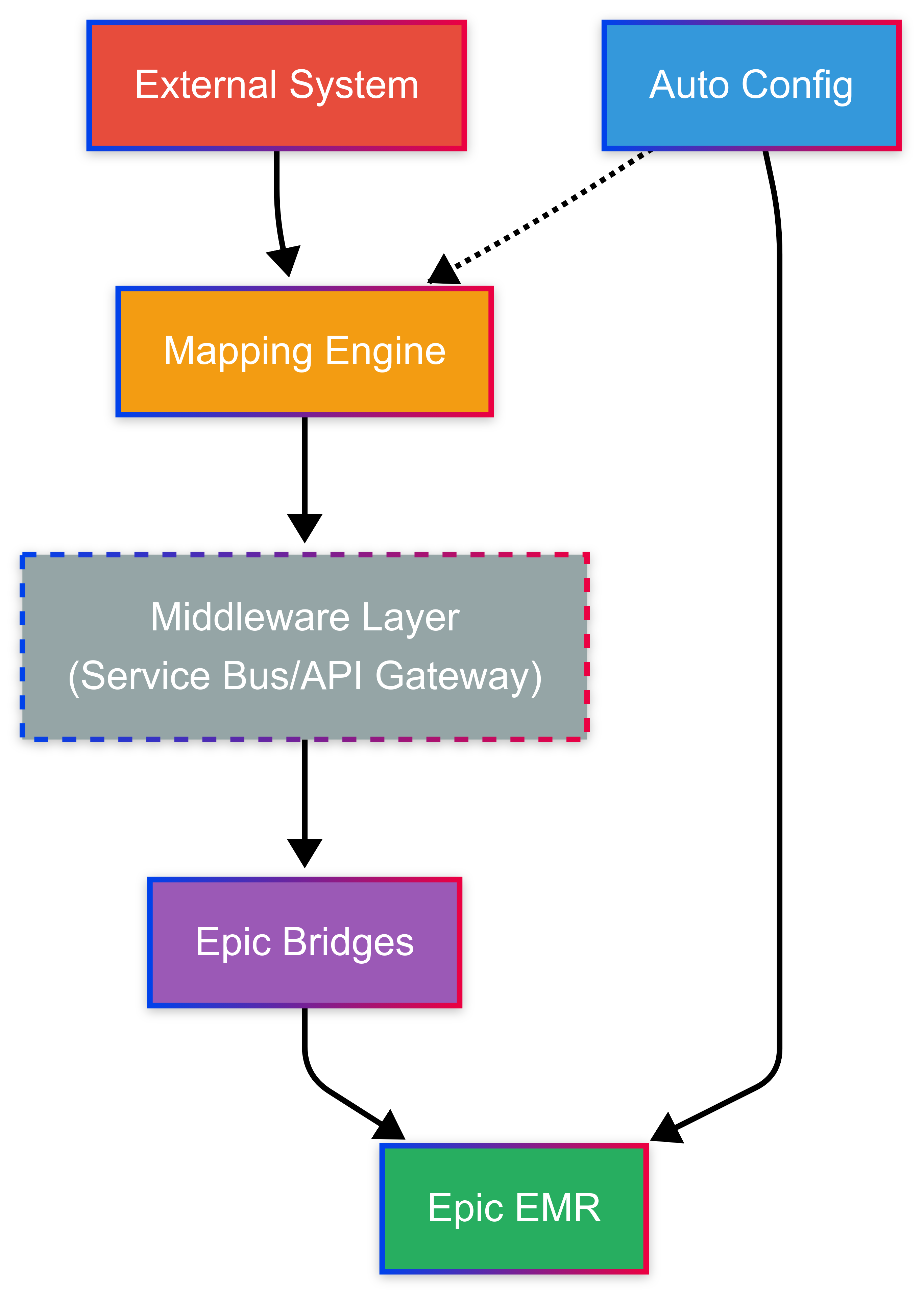
🔄 Flow 1: Unsolicited Data
External systems push data to Epic using patient identifiers (SSN/MRN). Perfect for lab results, monitoring data, and assessments.
Business Value:
- Immediate data integration without setup delays
- Supports any format: JSON, XML, HL7, or custom structures
- Real-time and batch processing capabilities
- Automatic field mapping with pattern recognition
- Epic flowsheets and rows created automatically
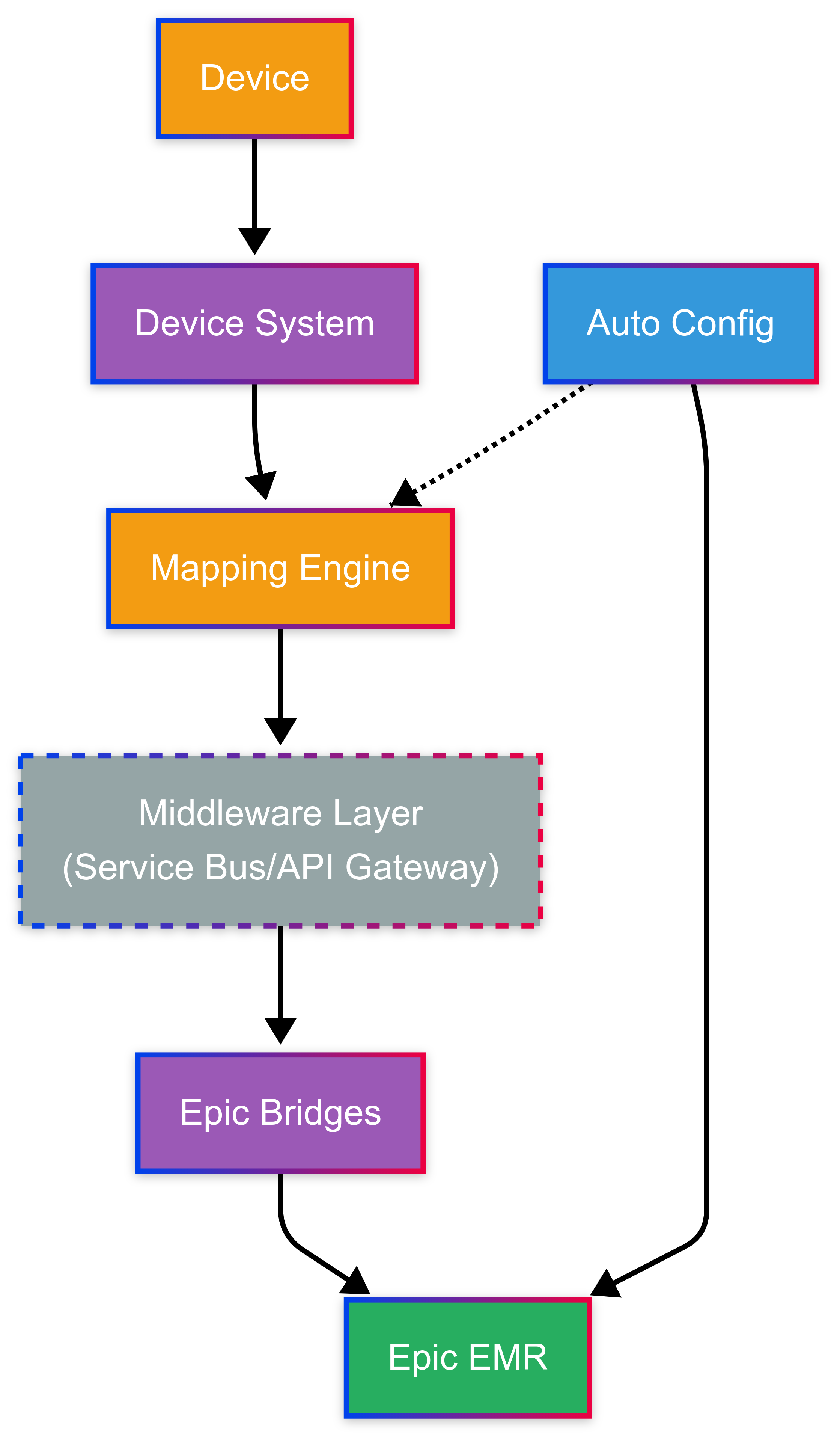
📱 Flow 2: Device-Registered
Devices pre-assigned to patients send data using device IDs only. Ideal for wearables, home monitors, and IoT devices.
Business Value:
- Enhanced patient privacy (no identifiers transmitted)
- Continuous monitoring capabilities
- Scales to thousands of devices per population
- Intelligent field mapping for any data structure
- Automated Epic configuration setup
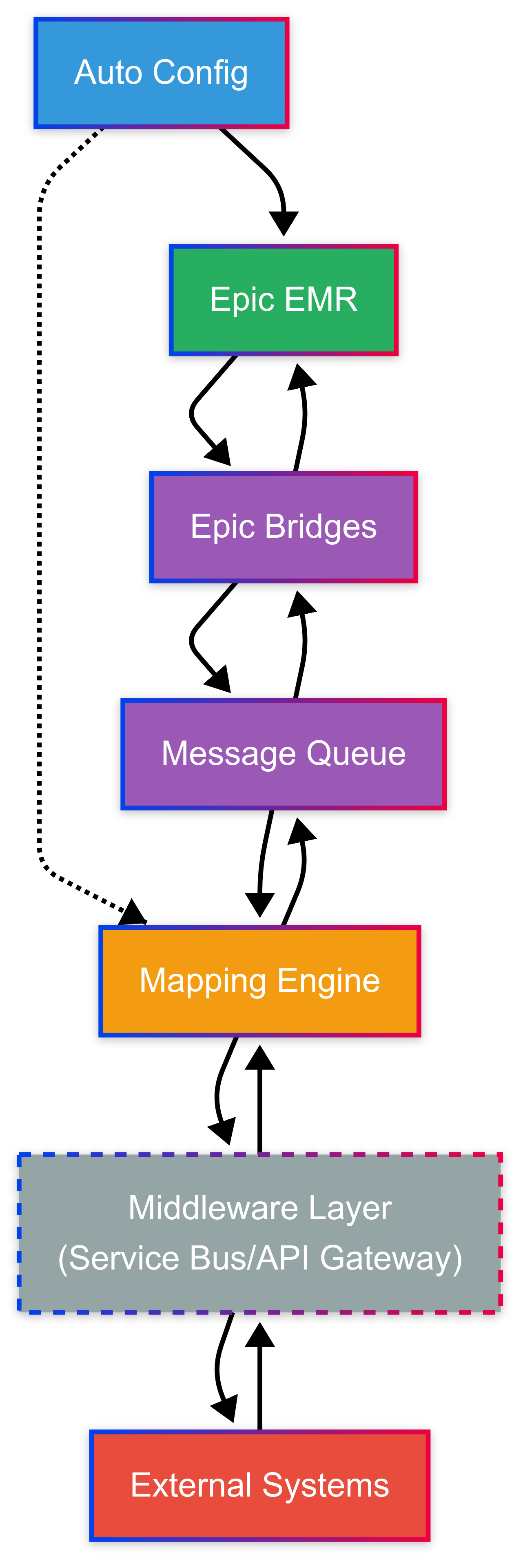
📋 Flow 3: Order-Based (Outbound)
Epic orders distributed to external systems via message queues. Enables scheduling, consultations, and procedure requests.
Business Value:
- No direct Epic connections to external systems
- Easy addition of new systems without Epic changes
- Reliable delivery with queue persistence
- Smart field mapping for target system compatibility
- Standardized Epic configuration across all orders
Flow 1 - Unsolicited Data Integration:
- Universal Input Processing: Accepts JSON, XML, CSV, HL7, or custom formats
- Intelligent Mapping Engine: Automated field mapping with healthcare pattern recognition
- Epic Integration: Generates HL7 messages and Epic import files automatically
- Patient Matching: Multiple identifier strategies (SSN, MRN, composite)
Flow 2 - Device-Registered Integration:
- Device Registry: Centralized database maintaining device-to-patient mappings
- Authentication: Secure device credentials and API key management
- Smart Field Mapping: Automatic mapping of device data to Epic structures
- Epic Configuration: Automated flowsheet and row generation for device data
Flow 3 - Order-Based Integration:
- Message Queue: Kafka, RabbitMQ, or cloud-based queuing systems
- Topic Routing: Hierarchical topics for targeted message delivery
- Intelligent Field Mapping: Automatic mapping from Epic orders to target formats
- Standardized Configuration: Consistent Epic setup patterns across all integrations
Lab results, microbiology, pathology reports
Image scheduling, preliminary reports
ECG monitoring, stress tests, arrhythmia detection
Remote monitoring, wearables, chronic disease management
Medication orders, dispensing confirmation, adherence tracking
OR scheduling, procedure requests, equipment coordination
Strategic Business Benefits
💰 Cost Reduction
Eliminate manual Epic configuration through automated flowsheet generation and standardized field mapping
⚡ Speed to Market
Accelerate new device integrations with automatic Epic setup and intelligent pattern recognition
🔧 Reduced Errors
Minimize configuration mistakes through automated Epic import file generation and standardized mapping
📈 Scalability
Support unlimited external systems with consistent Epic data structures and repeatable configurations
Traditional Integration Approach:
- Custom interface development required for each external system
- Extended testing and validation cycles for every integration
- High ongoing maintenance burden for multiple interfaces
- Epic Bridges complexity increases exponentially with each addition
Our Standardized Solution:
- Generic flows: One-time investment supporting all future integrations
- Rapid implementation through automated Epic configuration
- Centralized maintenance approach across all integrations
- Linear complexity growth regardless of system count
- Intelligent mapping engine handles any data structure
- Automatic Epic import file generation eliminates manual setup
Return on Investment: Organizations typically see positive ROI after implementing several external system integrations using the standardized approach.
Implementation Strategy
| Flow Type | Best For | Implementation Complexity | Time to Value |
|---|---|---|---|
| Unsolicited Data | Lab systems, monitoring, assessments | Moderate | Fast |
| Device-Registered | Wearables, home monitors, IoT devices | Low-Moderate | Very Fast |
| Order-Based | Scheduling, consultations, procedures | Higher | Moderate |
Phase 1: Foundation Setup
- Epic Bridges interface configuration for three generic flows
- Intelligent mapping engine deployment and configuration
- Pattern recognition system setup for healthcare data
- Epic import file generation framework setup
Phase 2: Flow Implementation
- Flow 1: Unsolicited data processing with automatic Epic setup
- Flow 2: Device registration database with smart field mapping
- Flow 3: Message queue infrastructure with intelligent mapping capabilities
Phase 3: System Onboarding
- External system configuration with automatic pattern detection
- Epic flowsheet and row generation using mapping engine
- End-to-end testing with automated Epic configuration
- Go-live support and standardized monitoring
Epic Configuration Tools
🛠️ Automated Epic Configuration Tool
Our Epic configuration tool is the cornerstone of the intelligent mapping engine. It analyzes any data structure from external systems and automatically generates Epic import files that create flowsheets and rows with proper field mappings. This eliminates manual Epic configuration and ensures standardized, error-free setups.
Key Capabilities:
- Universal Format Analysis: Reads JSON, XML, HL7, and custom data structures
- Automatic Epic Import Generation: Creates ready-to-import configuration files
- Healthcare Pattern Recognition: Identifies standard clinical data patterns automatically
- Standardized Configuration: Ensures consistent Epic setup across all integrations
Data Structure Analysis:
- Analyzes JSON, XML, CSV, HL7, and custom data formats
- Identifies data types, relationships, and field hierarchies
- Recognizes standard healthcare terminologies (LOINC, SNOMED, etc.)
- Maps fields to Epic's data model and naming conventions
- Applies intelligent pattern matching for clinical data structures
Epic Import File Generation:
- Creates flowsheet templates with appropriate row definitions
- Generates data element mappings and validation rules
- Produces Epic-compatible import files for direct system upload
- Includes comprehensive documentation and configuration guides
- Ensures standardized Epic structures across all integrations
Configuration Benefits:
- Eliminates manual Epic configuration completely
- Reduces implementation effort dramatically through automation
- Minimizes configuration errors and inconsistencies
- Ensures standardized Epic data structures across all systems
- Provides repeatable, reliable configuration patterns
- Enables rapid onboarding of new external systems